Answer Video Surveys with Less Visual Exposure
Take part in video surveys with less visual exposure: understand image protection options, what you can choose and why they do not mean anonymity.
Blurring and pixelation can reduce what you show in a video response without preventing you from explaining your experience in your own words. For the respondent, the benefit is being able to participate with less visual exposure when the study allows it. That may help you feel more comfortable, but it does not make the response anonymous.
You may want to explain why you abandoned a purchase or how you use a service, but not feel like showing your face or the space you are answering from. Understanding the image options and their limits helps you decide whether that format suits you before you record.
Three ways to show a response
This comparison illustrates the difference between keeping the original image, pixelating the face and applying full-image protection. These are not three options that are necessarily available in every survey: they depend on the study's settings.
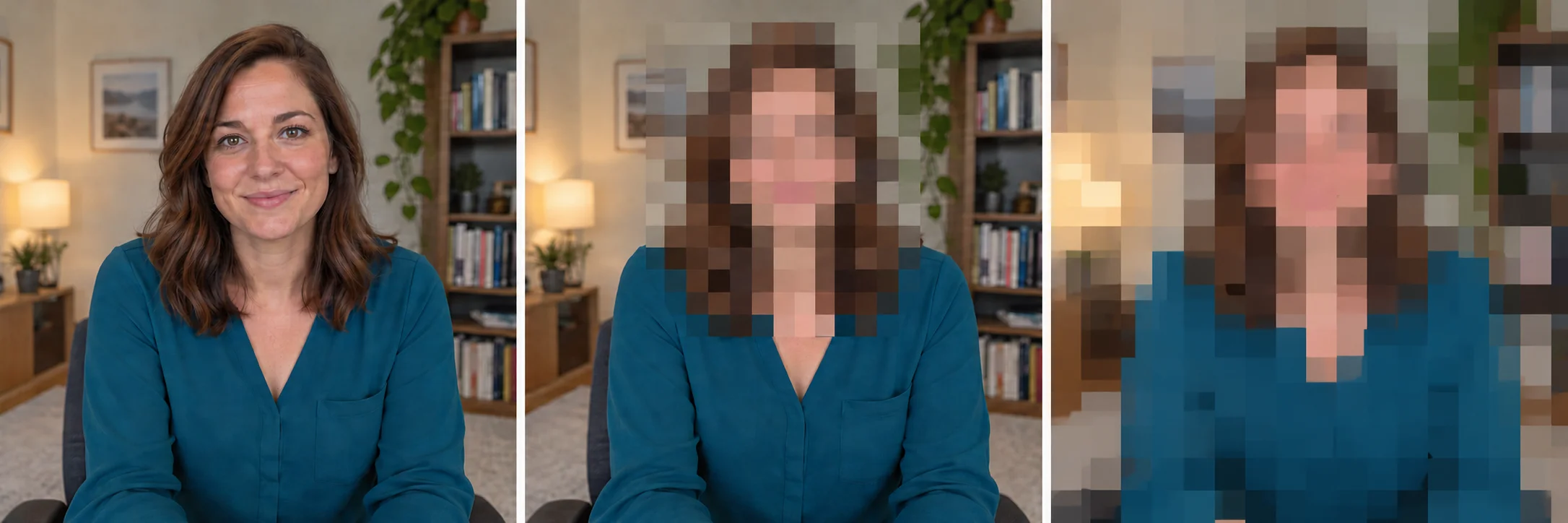
The original preserves visible details. Face mode applies pixelation to rectangular areas around detected faces and leaves the rest of the scene visible. Full-image protection reduces detail across the entire frame.
Less exposure without losing your words
An open-ended response lets you explain what matters to you without limiting yourself to selecting a checkbox. You can describe a difficulty, explain what you expected or add a nuance the question had not anticipated. If speaking feels more natural to you than writing, video can be a comfortable way to share that experience.
Reducing visual detail may ease concerns about appearing on camera. For some people, showing less of their face makes participating feel more manageable. For others, reducing how much of their surroundings is visible matters more. It is a possible source of comfort, not a promise that everyone will answer better, more honestly or for longer.
It is worth distinguishing the two protections. Face pixelation leaves elements such as clothing and the background visible. Full-image protection reduces detail across the whole scene, although shapes, colors or movements may still be visible. Neither is a reason to record information you do not want to share.
Know what you can choose before recording
The study's settings determine the options available. Visual protection can be turned off, optional or required. That means participants cannot always freely enable, disable or choose any mode. Check what the survey says rather than assuming they all work the same way.
VoiceCapture presents a consent flow for video responses and states that, when protection is enabled, it is applied before the video is uploaded. What matters for you is understanding what will be sent and how it will be used. Read the study information before agreeing; if something is unclear, ask the organizer.
Before starting, find a place without documents, screens or people who should not appear. Avoid saying names and other personal details that do not contribute to the response. If the flow offers a review before submission, use it to check both what can be seen and what can be heard.
Hiding the image is not the same as being anonymous
Your voice, the content of your account and contextual details can identify you even when your face is hidden. A transcript can also retain names, places or references you mentioned. Visual protection reduces information in the image; it does not eliminate those other clues on its own.
Nor does it replace a clear explanation of who will receive the response, how it will be used or how long it will be kept. If you need anonymity, do not infer it from the video's blurred appearance: confirm the study's conditions before participating.
Frequently asked questions
Can I respond without showing my face?
It depends on the study. When it offers face protection, pixelation reduces visible facial detail. It may be optional or required; it may also be turned off. Review the options and instructions before recording.
Does full-image protection also hide my voice?
No. Visual protection acts on the image; it does not mean the voice is modified. What you say and how you sound may still provide identifying information. Avoid sharing unnecessary details even when the image is protected.
Why choose video if I do not want to show every detail?
Because you may want to explain an experience by speaking without exposing your face or surroundings as clearly. Its value is in expressing yourself in a way that feels comfortable, provided the study's conditions and options suit you.
What should I check before submitting?
The survey's purpose, how the response will be used, the protection options available and what you have included in the recording. If there is a review step, check the image and audio. If important information is missing, ask for clarification before submitting.
Explore VoiceCapture's video options
You can learn how video responses work and consider which mode suits the study you are participating in. The essential point is knowing what you are sharing and being able to decide with that information.
Ready to add voice to your surveys?
Start free — no credit card required. Setup takes 2 minutes.
Try Voice Capture Free